As a React Node.js full-stack developer, I’ve learned that the gap between a side project and a production-ready application isn’t just technical — it’s architectural. Over the years, I’ve shipped everything from internal dashboards for logistics companies to multi-tenant SaaS platforms for B2B clients. And in almost every case, React + Node.js has been the stack I keep coming back to — not out of habit, but because it genuinely works.
In this guide, I’ll walk you through how to build a full-stack app with React and Node.js in 2026 — from project structure to deployment — with the kind of practical detail you won’t find in a five-minute YouTube tutorial.
Why Every React Node.js Full-Stack Developer Chooses This Stack in 2026
Before we get into the “how,” let’s briefly address the “why.” With so many frameworks and runtimes competing for attention — Bun, Deno, SvelteKit, Remix, Astro — you might wonder if React and Node.js are still worth betting on.
They are. Here’s why:
- Ecosystem maturity: React has over a decade of community investment. The tooling, libraries, and patterns are battle-tested.
- JavaScript everywhere: Using JavaScript/TypeScript on both client and server reduces context-switching and allows code sharing between layers.
- Hiring and community: Whether you’re building a team or looking for a React Node.js full-stack developer to hire, the talent pool is massive.
- Performance headroom: With React Server Components, streaming SSR, and optimized build tooling via Vite, React 19 is faster than ever.
- Node.js stability: Node.js LTS versions in 2026 are performant, well-documented, and have excellent native TypeScript support.
✅ In my experience evaluating modern alternatives, React and Node.js remains the most pragmatic choice for client projects requiring fast delivery and long-term maintainability in 2026.
The Stack Every React Node.js Full-Stack Developer Should Know in 2026
Here’s the complete tech stack we’ll use in this guide:
| Layer | Technology | Version |
|---|---|---|
| Frontend | React (with Vite) | 19.x |
| Routing | React Router | v7 |
| Backend | Node.js + Express | Node 22 LTS |
| Database | PostgreSQL | 16 |
| ORM | Prisma | 5.x |
| Auth | JWT + bcrypt | — |
| Validation | Zod | 3.x |
| Deployment | Railway / Render | — |
This is a production-ready stack — not a “just enough to pass a tutorial” setup. Every choice here reflects real-world usage from client projects I’ve delivered. For the full list of what’s new in React 19, see the official React documentation at react.dev.
Step 1: Project Structure — Get This Right From the Start
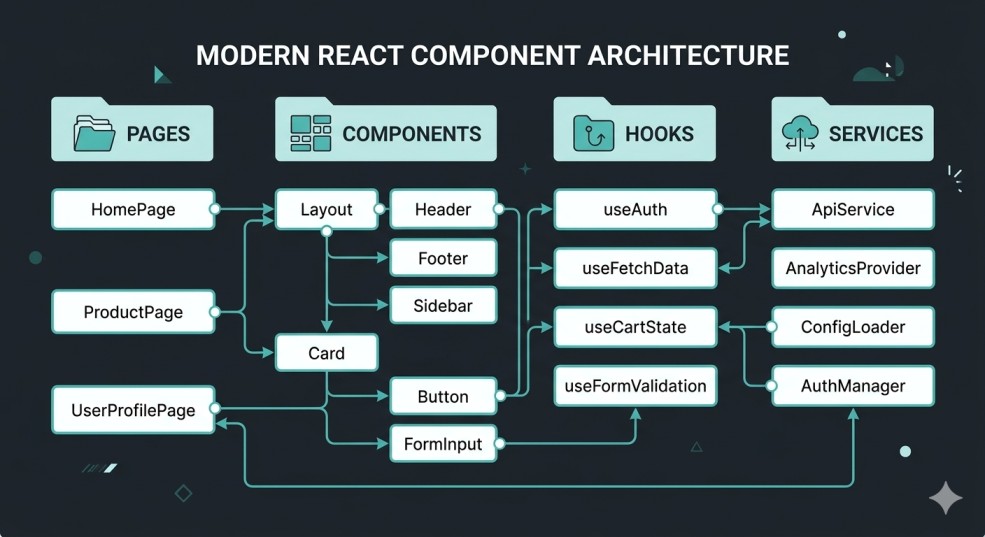
One of the most common mistakes I see from React Node.js full-stack developers entering production work is treating structure as an afterthought. A messy monorepo becomes a liability within weeks.
Here’s the folder structure I use across client projects:
/my-app
├── /client          # React (Vite) frontend
│   ├── /src
│   │   ├── /components
│   │   ├── /pages
│   │   ├── /hooks
│   │   ├── /services   # Axios API calls
│   │   └── main.jsx
│   └── vite.config.js
├── /server          # Node.js + Express backend
│   ├── /routes
│   ├── /controllers
│   ├── /middleware
│   ├── /prisma
│   └── index.js
├── /shared          # Shared types/utilities (TypeScript)
└── package.json     # Root-level scripts
The /shared directory is where TypeScript really earns its keep. Defining your API response types once and consuming them in both the frontend and backend eliminates a whole category of bugs.
Pro tip: Use a root package.json with workspace scripts to run both client and server simultaneously with a single npm run dev command using concurrently.
Step 2: Setting Up the Node.js Backend

Let’s start with the server. Install your dependencies first:
cd server
npm init -y
npm install express cors dotenv zod jsonwebtoken bcrypt
npm install prisma @prisma/client
npm install -D typescript ts-node nodemon @types/express
Here’s a minimal but production-structured index.js:
import express from 'express';
import cors from 'cors';
import dotenv from 'dotenv';
import authRoutes from './routes/auth.js';
import userRoutes from './routes/users.js';

dotenv.config();

const app = express();

app.use(cors({ origin: process.env.CLIENT_URL }));
app.use(express.json());

// Routes
app.use('/api/auth', authRoutes);
app.use('/api/users', userRoutes);

// Health check
app.get('/health', (req, res) => res.json({ status: 'ok' }));

const PORT = process.env.PORT || 5000;
app.listen(PORT, () => console.log(`Server running on port ${PORT}`));
Notice the CORS configuration explicitly references CLIENT_URL from your environment. Never use cors({ origin: '*' }) in production — it’s a security liability.
Structuring Your Routes and Controllers
Keep your route files thin. Business logic belongs in controllers:
// routes/users.js
import { Router } from 'express';
import { getUser, updateUser } from '../controllers/users.js';
import { authenticate } from '../middleware/auth.js';

const router = Router();

router.get('/:id', authenticate, getUser);
router.put('/:id', authenticate, updateUser);

export default router;
This pattern keeps your code maintainable as the API grows — something I’ve seen neglected on projects that later needed a refactor mid-sprint.
Step 3: Database Setup with Prisma
Prisma is my preferred ORM for Node.js projects in 2026. The developer experience is excellent, the type safety is genuine, and the migration system is reliable in production.
Initialize Prisma:
npx prisma initDefine a simple schema in prisma/schema.prisma:
model User {
  id        String   @id @default(uuid())
  email     String   @unique
  password  String
  name      String
  createdAt DateTime @default(now())
  posts     Post[]
}

model Post {
  id        String   @id @default(uuid())
  title     String
  content   String
  published Boolean  @default(false)
  author    User     @relation(fields: [authorId], references: [id])
  authorId  String
  createdAt DateTime @default(now())
}
Run your migration:
npx prisma migrate dev --name initAccording to freelance developer Usman Nadeem: “Prisma’s generated TypeScript types eliminate an entire class of runtime errors. On a recent client project, switching from raw SQL queries to Prisma cut our database-related bug reports by roughly 60% within the first month.”
Step 4: Building the React Frontend
On the client side, I use Vite as the build tool in 2026. Create React App is officially deprecated and Vite is dramatically faster.
npm create vite@latest client -- --template react
cd client
npm install axios react-router-dom
Organizing API Calls with Axios
Create a centralized API client:
// src/services/api.js
import axios from 'axios';

const api = axios.create({
  baseURL: import.meta.env.VITE_API_URL,
});

api.interceptors.request.use((config) => {
  const token = localStorage.getItem('token');
  if (token) {
    config.headers.Authorization = `Bearer ${token}`;
  }
  return config;
});

export default api;
This interceptor pattern means you write authentication logic once, not in every individual API call. That’s the kind of architectural decision that separates maintainable React developer portfolio projects from ones that collapse under their own weight.
A Clean Page Component Pattern
// src/pages/Dashboard.jsx
import { useEffect, useState } from 'react';
import api from '../services/api';

export default function Dashboard() {
  const [posts, setPosts] = useState([]);
  const [loading, setLoading] = useState(true);

  useEffect(() => {
    api.get('/posts')
      .then(res => setPosts(res.data))
      .finally(() => setLoading(false));
  }, []);

  if (loading) return <p>Loading...</p>;

  return (
    <div>
      <h1>Your Posts</h1>
      {posts.map(post => (
        <div key={post.id}>
          <h2>{post.title}</h2>
          <p>{post.content}</p>
        </div>
      ))}
    </div>
  );
}
Step 5: Authentication — JWT Done Right
Authentication is where most tutorials cut corners. Here’s how to implement it properly.
Backend — generating a JWT:
// controllers/auth.js
import jwt from 'jsonwebtoken';
import bcrypt from 'bcrypt';
import { prisma } from '../prisma/client.js';

export async function login(req, res) {
  const { email, password } = req.body;
  const user = await prisma.user.findUnique({ where: { email } });

  if (!user || !(await bcrypt.compare(password, user.password))) {
    return res.status(401).json({ error: 'Invalid credentials' });
  }

  const token = jwt.sign(
    { userId: user.id },
    process.env.JWT_SECRET,
    { expiresIn: '7d' }
  );

  res.json({ token, user: { id: user.id, name: user.name, email: user.email } });
}
Important: Store your JWT_SECRET in .env and never commit it. Use a secret of at least 32 characters. For production apps, I recommend rotating secrets and implementing refresh token logic.
Step 6: Connecting Frontend to Backend
With your API running locally on port 5000 and your React app on port 3000, configure Vite’s proxy to avoid CORS issues during development:
// vite.config.js
export default {
  server: {
    proxy: {
      '/api': 'http://localhost:5000',
    },
  },
};
This means your frontend calls /api/auth/login and Vite proxies it to http://localhost:5000/api/auth/login — no CORS errors, no hardcoded URLs.
Step 7: Input Validation with Zod
Never trust user input. Validate everything on the server using Zod:
import { z } from 'zod';

const loginSchema = z.object({
  email: z.string().email(),
  password: z.string().min(8),
});

export function validateLogin(req, res, next) {
  const result = loginSchema.safeParse(req.body);
  if (!result.success) {
    return res.status(400).json({ errors: result.error.flatten() });
  }
  req.body = result.data;
  next();
}
I, Usman Nadeem, recommend Zod as a first-class validation tool because it doubles as your TypeScript type source — z.infer<typeof loginSchema> gives you a fully typed object with zero duplication.
Step 8: Deployment
For most projects, I deploy to Railway (backend + database) and Vercel (frontend). Both have generous free tiers and excellent DX.
Deployment checklist:
- Set all environment variables in your hosting platform’s dashboard
- Update
CORSto allow your Vercel domain - Run
prisma migrate deploy(notdev) in production - Enable health check endpoints for uptime monitoring
- Set
NODE_ENV=productionto disable verbose error outputs
For larger client projects, I containerize with Docker and deploy to a VPS, but Railway/Vercel is the right call for most freelance engagements.
Common Mistakes Every React Node.js Full-Stack Developer Should Avoid
Let me save you some painful debugging sessions:
- Don’t use
nodemonin production — usepm2or your platform’s native process manager - Don’t skip database indexing — add
@@indexin Prisma for frequently queried fields - Don’t store tokens in localStorage for sensitive apps — use HttpOnly cookies instead
- Don’t ignore rate limiting — add
express-rate-limitto your auth endpoints - Don’t nest your React components too deeply — flat component trees are faster and more testable
Working With a Full-Stack Developer for Hire
Building a full-stack app is one thing. Shipping it reliably, maintaining it, and iterating on it is another. Many startups and product teams get to a point where they need an experienced React Node.js full-stack developer they can trust — someone who’s already solved the problems they’re about to hit.
I’m Usman Nadeem, a freelance full-stack developer with years of experience building production applications using React, Node.js, Laravel, and PostgreSQL. I work with startups, agencies, and product teams on a contract basis — whether that’s building from scratch, joining an existing team, or rescuing a project that’s gone sideways.
If you’re looking for a full-stack web developer for hire, you can explore my React developer portfolio and past projects, then get in touch through my contact page. I typically respond within 24 hours.
Conclusion
Building a full-stack app with React and Node.js in 2026 is more accessible than ever — but “accessible” doesn’t mean “easy.” The difference between a side project and a production-ready application comes down to the decisions you make in structure, security, and scalability from day one.
Here’s your action plan:
- Start with a clean monorepo structure —
/client,/server,/shared - Use Prisma for your database layer — the type safety pays dividends immediately
- Implement JWT authentication properly with validation middleware
- Configure your Vite proxy for seamless local development
- Deploy to Railway + Vercel for a fast, professional launch
The stack described in this guide is what I use on real freelance client projects. It’s not theoretical — it’s been tested under production load.
If you’re building something and need a hand, or if you’re looking for a freelance React Node.js full-stack developer to bring in for your project, check out my portfolio or reach out directly.
Frequently Asked Questions
Is becoming a React Node.js full-stack developer still worth it in 2026?
Absolutely. React remains the most widely used frontend library, and Node.js continues to power millions of APIs in production. The ecosystem, tooling, and job market for this stack are stronger than ever. If you’re starting out, there’s no more pragmatic combination to learn.
2. Do I need TypeScript for a React Node.js project?
TypeScript isn’t strictly required, but I strongly recommend it for any project you plan to maintain or scale. It catches type mismatches at compile time, makes refactoring safer, and drastically improves the experience when using Prisma and Zod together.
3. What’s the difference between prisma migrate dev and prisma migrate deploy?
migrate dev is for local development — it creates migration files and applies them interactively. migrate deploy is for production — it applies pending migrations without prompting. Always use deploy in your CI/CD pipeline.
4. How do I handle file uploads in a React + Node.js app?
Use multer on the Node.js side to handle multipart/form-data requests. For production, store files in an object storage service like AWS S3 or Cloudflare R2 rather than on the server’s filesystem, which doesn’t persist across deployments.
5. How long does it take to build a full-stack app with this stack?
Depends on scope, but a well-structured CRUD application with auth — like what we’ve described here — takes an experienced developer about 3–5 days to scaffold and deploy. From there, feature development is what takes the most time. If you need to move faster, hiring a freelance full-stack web developer is often more cost-effective than building your in-house capacity from scratch.
Looking for a React Node.js Full-Stack Developer for Hire?
If this guide gave you clarity on what’s involved in building a full-stack app, imagine having an experienced developer handle it for you — end to end. I’m Usman Nadeem, a freelance full-stack developer specializing in React, Node.js, and PostgreSQL. Whether you need a new app built from scratch, an existing codebase cleaned up, or a reliable developer to join your team on a contract basis, I’m available for hire. View my portfolio to see past projects, or get in touch to discuss your requirements. I typically respond within 24 hours.